
How users opt in to Hommie SMS Alerts
Hommie, LLC sends account notification text messages only to users who opt in inside the Hommie mobile app. Opt-in happens after login, so this page shows the exact steps and wording a user sees.
Program summary
- Program
- Hommie SMS Alerts
- Sender
- Hommie, LLC
- Messages
- Saved-property alerts, listing activity, connections, market insights, app updates, and other notifications the user enabled. No chat messages and no third-party marketing.
- How to opt in
- In the app, Profile → Notification settings → Delivery Channels → SMS Alerts (off by default)
- Frequency
- Varies with the user's activity and alert settings
- Cost
- Message and data rates may apply
- Opt out
- Reply STOP at any time, or turn off SMS Alerts in the app
- Help
- Reply HELP, or email support@hommie.app
Step 1. The user adds their own mobile number
After creating an account and logging in, the user opens Profile → Edit Profile and types in their own mobile number. The phone number field is optional. Adding a number does not turn on SMS. SMS Alerts stays off until step 3.
Name
Phone Number
Step 2. The user opens Notification settings
From their profile, the user taps the Notification settings (bell) button. This opens the Notifications screen, which lists every alert type. Under Delivery Channels they can choose push, email, and SMS separately.
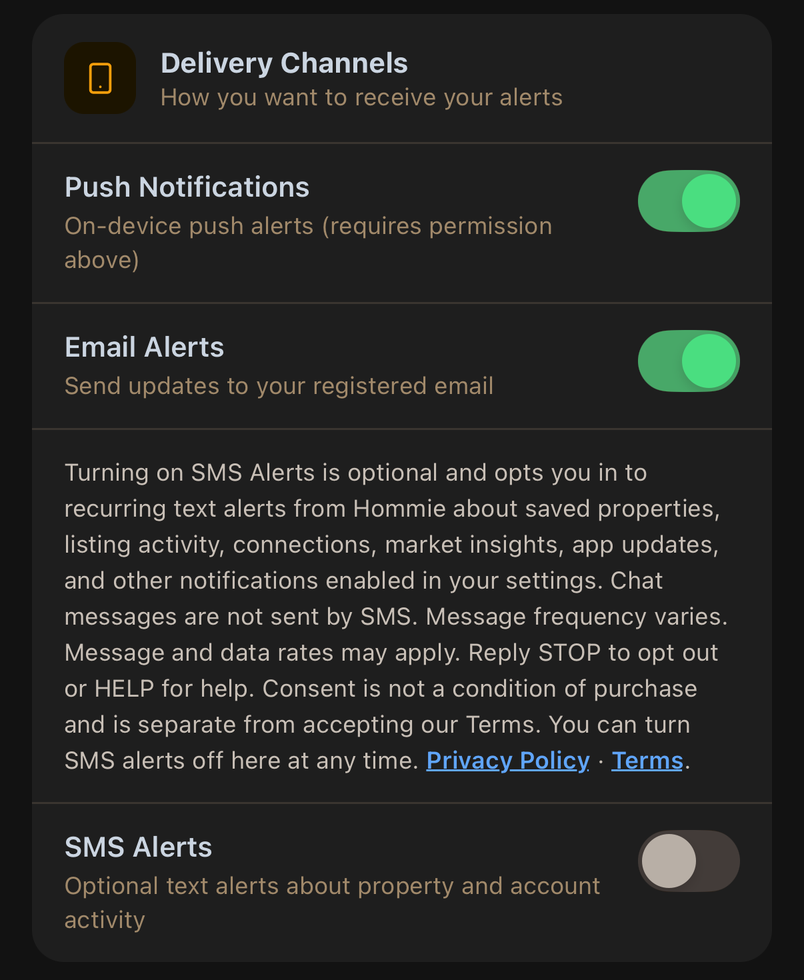
Step 3. The user reads the disclosure and turns on SMS Alerts
The full consent disclosure appears directly above the SMS Alerts toggle. The toggle is off by default and is never pre-selected. It can't be turned on without a phone number on the account. When the user turns it on and saves, Hommie records that they consented, the disclosure version they saw, and the phone number they consented with. If that number changes later, SMS stops until the user opts in again.
Exact disclosure shown in the app:
Turning on SMS Alerts is optional and opts you in to recurring text alerts from Hommie about saved properties, listing activity, connections, market insights, app updates, and other notifications enabled in your settings. Chat messages are not sent by SMS. Message frequency varies. Message and data rates may apply. Reply STOP to opt out or HELP for help. Consent is not a condition of purchase and is separate from accepting our Terms. You can turn SMS alerts off here at any time. Privacy Policy · Terms.
Delivery Channels
How you want to receive your alerts
Push Notifications
On-device push alerts
Email Alerts
Send updates to your registered email
Turning on SMS Alerts is optional and opts you in to recurring text alerts from Hommie about saved properties, listing activity, connections, market insights, app updates, and other notifications enabled in your settings. Chat messages are not sent by SMS. Message frequency varies. Message and data rates may apply. Reply STOP to opt out or HELP for help. Consent is not a condition of purchase and is separate from accepting our Terms. You can turn SMS alerts off here at any time. Privacy Policy · Terms.
SMS Alerts
Optional text alerts about property and account activity
Screenshots from the app
Opting out and privacy
- Reply STOP to any message to stop all SMS from Hommie. Reply HELP for help. The user can also turn SMS Alerts off in the app at any time.
- Consent to SMS is optional. It isn't required to use Hommie or to make a purchase.
- Mobile numbers and SMS opt-in data and consent are never shared, sold, or rented to third parties or affiliates for marketing or promotional purposes. Twilio, our SMS provider, processes them only to deliver messages. See our Privacy Policy and Terms.